Fishing Scene Laser Cut File Guide
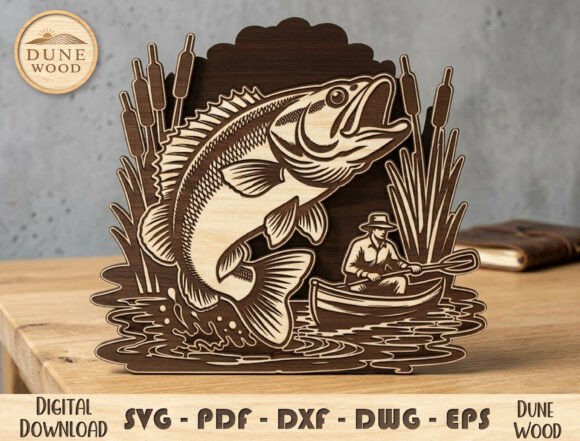
Creating layered wood art requires more than just a machine; it demands a design that understands depth, shadow, and narrative. The Fishing Scene Laser Cut File offers a compelling solution for makers looking to produce intricate, multi-dimensional decor. This specific design captures a serene moment: a fisherman in a boat, a fish breaking the water’s surface, and surrounding reeds that frame the composition. For anyone interested in laser cutting, this file represents a balance between artistic expression and technical feasibility.
Whether you are a hobbyist decorating your home or a small business owner scaling production, understanding how to leverage this digital asset is key. The value of such a file lies not just in the image itself, but in its adaptability across different materials, machines, and skill levels.
Understanding the Design Structure
At its core, this laser cut file is a vector-based blueprint for a 3D object. Unlike simple 2D engravings, this design relies on layering. Each component—the boat, the water ripples, the jumping fish, and the background foliage—is separated into distinct planes. When assembled, these layers create parallax effects and shadows that give the artwork depth.
The file is optimized for precision. It accounts for kerf (the width of the laser beam) and ensures that tabs or joints are placed logically for assembly. For users of machines like Glowforge, xTool, or OMTech, this means less time troubleshooting fit issues and more time focusing on finishing techniques. The inclusion of six standard formats—AI, DWG, EPS, DXF, PDF, and SVG—ensures compatibility with virtually any design software or CNC controller.
Perspectives for Different Makers
The utility of a Fishing Scene Laser Cut File varies significantly depending on who is holding the mouse. Here is how different audiences might approach this project.
The Beginner Hobbyist
For those new to laser cutting, the primary concern is often ease of use. Beginners need files that are "ready to cut" without extensive modification. This design serves as an excellent learning tool because it introduces the concept of layering without overwhelming complexity. The clear separation of elements allows novices to practice alignment and gluing techniques. Moreover, the rustic nature of wood hides minor imperfections, making it a forgiving project for those still calibrating their power and speed settings.
The Experienced Creator
Seasoned makers look for flexibility and quality. They appreciate that the vector files are fully scalable. An experienced user might resize the design to fit a specific frame or combine elements from this file with other assets to create a custom scene. They might also experiment with material contrast, using dark walnut for the foreground silhouettes and lighter maple for the background to enhance visibility. For this group, the file is a foundation upon which they can build unique variations, testing different finishes or lighting integrations.
The Small Business Owner
Entrepreneurs and craft sellers prioritize commercial value and efficiency. A fishing-themed decor item has a clear target market: anglers, fathers, and lovers of outdoor life. This niche appeal makes it a strong candidate for personalized gifts. Business owners can leverage this file to create product lines quickly. Since the file is digital, there is no inventory cost until a sale is made. The ability to produce consistent, high-quality results across multiple units is crucial here. The clean lines and professional finish of this design help maintain brand reputation, ensuring that each piece looks polished and premium.
Educators and Workshop Leaders
In educational settings, this project offers lessons in both technology and art. Teachers can use the Fishing Scene Laser Cut File to demonstrate geometric decomposition—breaking a complex image into simple shapes. It also teaches spatial reasoning as students assemble the 3D structure. The theme is universally recognizable, which helps keep students engaged. Furthermore, working with wood provides a tactile experience that contrasts with digital design, offering a holistic learning environment.
Technical Considerations and Material Choice
To achieve the best results, material selection is critical. Plywood is the most common choice for layered projects due to its stability and attractive edge grain. Birch plywood, in particular, offers a smooth surface that takes stain well and cuts cleanly. However, MDF (Medium Density Fiberboard) is another option for those planning to paint the final piece, as it lacks grain and provides a uniform texture.
When preparing the file for your machine, consider the thickness of your material. Most layered designs assume a standard thickness, such as 3mm or 1/8 inch. If you use thicker stock, you may need to adjust the spacing between layers or modify the joint dimensions in the vector file. The included DXF and DWG formats are particularly useful here, as they can be edited in CAD software to tweak these measurements precisely.
Engraving details can also enhance the final look. While the primary impact comes from the cut layers, adding subtle engraving textures to the water or the fish scales can add realism. Machines with high-resolution cameras, like the Glowforge, allow for precise placement of these engraved details relative to the cut lines.
Customization and Personalization
One of the strongest advantages of digital files is the ability to personalize. For a gift, you might add a nameplate to the base of the boat or engrave a date on the background layer. This transforms a generic decor item into a cherished keepsake. The vector nature of the file makes adding text straightforward. You can simply import the SVG into your design software, add your text element, and arrange it within the existing composition.
Color variation is another avenue for customization. Instead of natural wood, you can paint individual layers before assembly. A blue-tinted water layer or a green-tinted reed section can make the scene pop. This approach appeals to consumers looking for vibrant, modern decor rather than traditional rustic styles.
Why This Design Works for Outdoor Themes
Fishing is more than a sport; it is a cultural touchstone for many. It represents patience, connection with nature, and tranquility. A Fishing Scene Laser Cut File captures these emotions visually. The silhouette of the fisherman is iconic, instantly communicating the theme without needing realistic detail. This abstraction allows the viewer to project their own memories onto the piece.
For home decor, this theme fits well in cabins, living rooms, or offices. It complements other natural elements like stone, leather, or plants. The layered wood aesthetic adds warmth to a space, contrasting nicely with modern metal or glass furnishings. This versatility ensures that the final product remains relevant in various interior design styles.
Making the Decision to Use This File
Before downloading, assess your current project needs. If you are looking for a quick, high-impact project that showcases the capabilities of your laser cutter, this design is a strong candidate. It balances detail with manufacturability. If you are seeking to expand your product catalog with seasonal or thematic items, fishing decor performs well year-round, with spikes in popularity during Father’s Day and holiday seasons.
Consider your machine’s capabilities. While this file is optimized for most desktop lasers, ensure your work area is large enough for the desired final size. If you plan to cut multiple copies, nesting the parts efficiently in your software can save material and time. The scalability of the AI and EPS files allows you to shrink the design for keychains or expand it for large wall art, providing long-term usefulness beyond a single application.
Ultimately, the Fishing Scene Laser Cut File is a tool. Its value is realized through your creativity, material choices, and finishing skills. By understanding the design’s structure and aligning it with your specific goals, you can create stunning wooden artworks that resonate with viewers and stand the test of time.